
Fixing One Mispronounced Word in an AI Song Without Starting Over
The song is almost perfect except for one word the singer keeps getting wrong. Here is how to repair that line without rerolling the whole track.
You know the feeling. The chorus lands, the mix sits right, the vocal has exactly the grain you were after, and then, in the second verse, the singer turns “Siobhan” into “See-oh-bahn,” or sings “live” like the adjective when you meant the verb. One word. And the instinct is to regenerate the whole song until it comes out right.
That instinct is expensive. Rerolling gives you a new performance, which usually means a slightly different melody, a different breath in the bridge, and a chorus that is somehow never quite as good as the one you lost. Over on Reddit, people trade stories about burning hundreds of credits chasing a single word. There is a calmer way to do it.
First, find out why the word is wrong
Before you touch anything, listen to the bad word three or four times and ask which of these it is:
- The model read the spelling, not the sound. Names, borrowed words and brand names fall into this most often. “Niamh,” “Gyllenhaal” and “Xiaomi” are all spelled in ways an English reader would guess wrong.
- The word has two pronunciations. “Read,” “lead,” “live,” “wind” and “tear” change with meaning, and the model has to guess which one you meant.
- The stress landed on the wrong beat. The sounds are right but the emphasis falls on the wrong syllable, so “deSERT” comes out as “DEsert.”
- The line is simply too crowded. Too many syllables for the space, so the singer swallows one of them.
The fix is different for each, so this step is worth thirty seconds.
Respell the word the way it sounds
For the first two cases, write the word as you want it heard, not as it is spelled. Fixing “Siobhan” in the lyric is easy: write “Shi-vawn.” “Live,” the verb, can become “liv.” A hyphen often helps the singer place each syllable, and breaking a long name into parts tells the model where the beats go.
A few habits that tend to work:
- Spell vowels with common English words in mind: “ay” as in day, “ee” as in see, “oh” as in go.
- Keep the respelling short. “Shi-vawn” is better than “Shuh-vaaawwn.”
- If the respelling looks odd in your published lyrics, that is fine. Keep a clean copy of the real lyric for liner notes and use the phonetic one only in the generation field.
For stress problems, try moving the word so its strong syllable falls on a strong beat, or put a short word in front of it so the rhythm pushes the emphasis to the right place.
Start with Smart refine: describe the fix in plain words
In EasyMusic, open the finished song and choose Smart refine (AI Refine). Instead of selecting audio, you write what should change, in up to 500 characters. It is the quickest way to fix a word, because you can say exactly what you want the way you would to a session singer:
In verse two, the name “Siobhan” should be sung “Shi-vawn”. Change only that word. Keep the other lyrics, the melody and the vocal character.
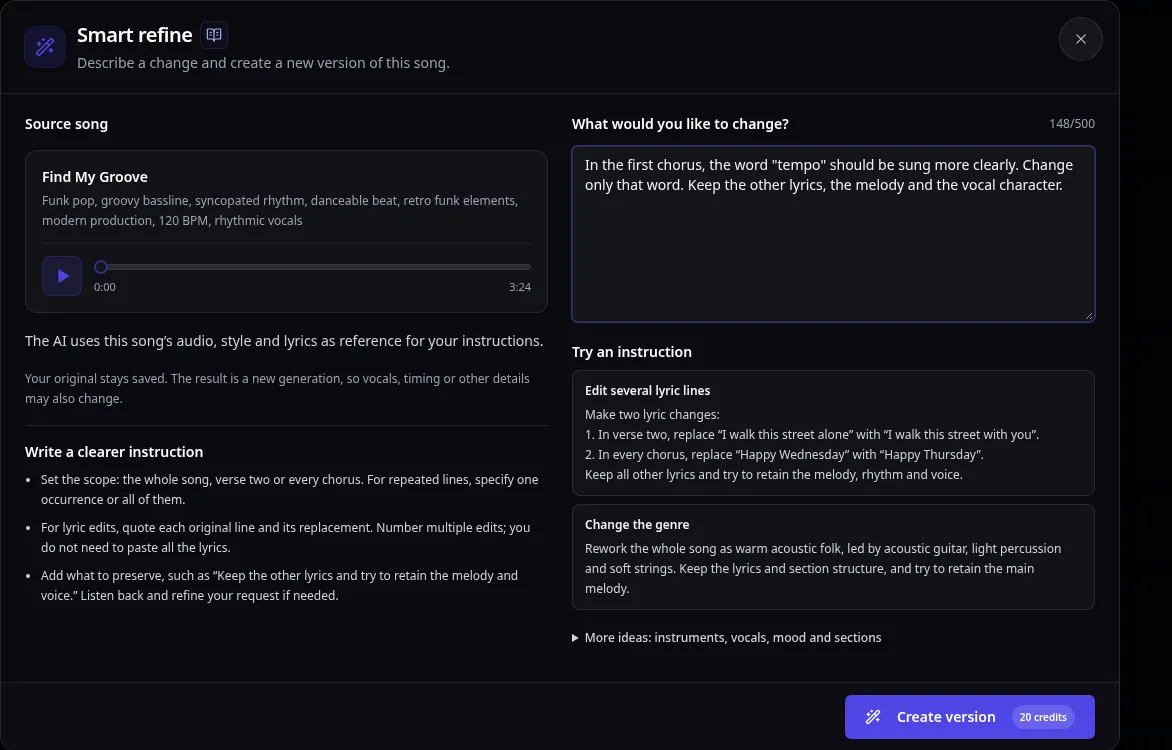
A few things make these instructions work:
- Quote the exact phrase and say where it is: verse two, the final chorus, or every time it appears.
- Give the sound, not just the spelling. Put the respelling from the previous step right in the instruction.
- Say what to keep. Name the melody, the voice and the other lyrics explicitly.
- One goal per request. If you also want quieter drums, ask for that separately, so you know which instruction caused which change.
Refine creates a new version and keeps your original saved. It is a new generation, though, so listen to the whole song, not just the fixed word. Now and then a verse you were not touching comes back slightly different. It costs 20 credits at the time of writing, and the Smart refine tutorial has more examples of good instructions.
When you need surgical precision: Edit Music
If Refine fixes the word but something else you loved moved, or the song is one you cannot risk changing anywhere else, switch to Edit Music. Here you select a time range on the waveform alongside the synced lyrics and write new words for just that stretch. Everything outside the selection stays exactly as it was.
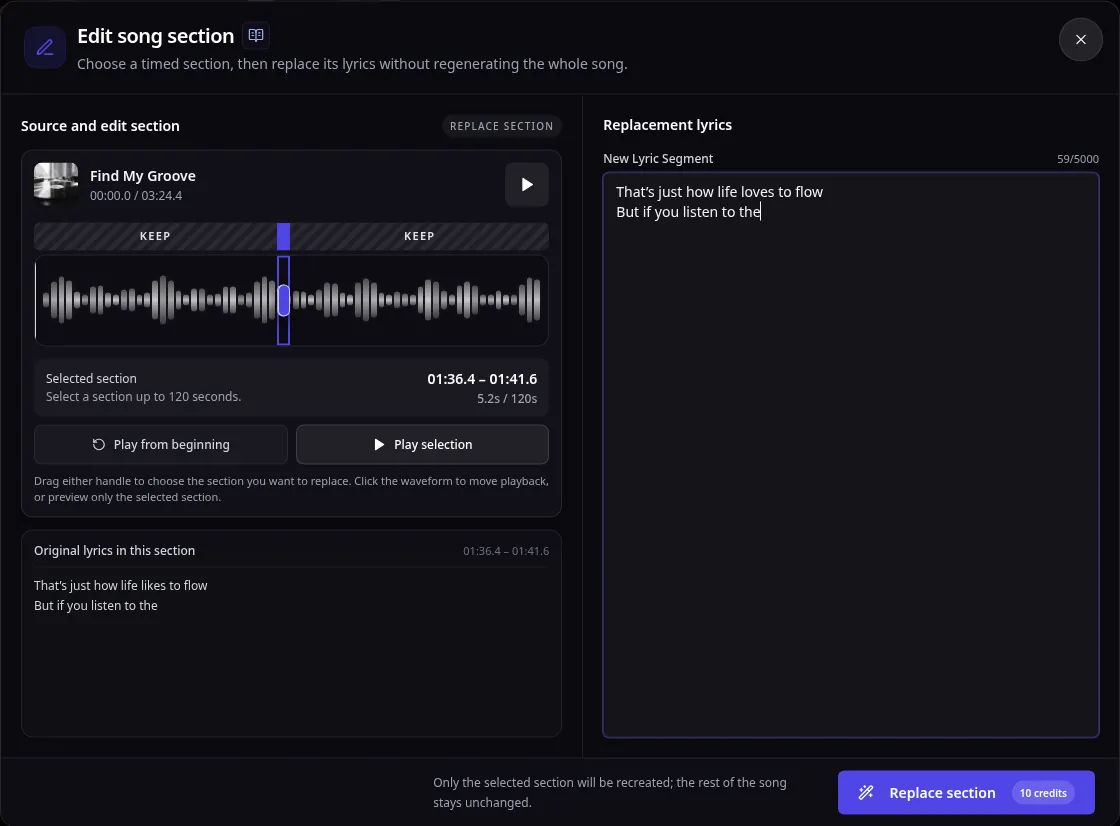
The temptation is to select only the broken word. Resist it. A one-word window gives the model almost no musical context, and the joins on either side tend to sound stitched. Select the whole line instead, starting just before the pickup note and ending after the last held syllable. Keep roughly the same number of sung syllables as the original; matching rhythm matters more than matching letters. The lyric editing tutorial covers the selection rules. The current limit is 120 seconds, and an edit costs 10 credits.
Listen like an editor
Whichever tool you used, do not judge the result on the fixed word alone. Listen to:
- The line before the fix, to hear whether the entrance is smooth.
- The fixed line itself, to hear whether the word is right and the melody still fits.
- The line after, to hear whether the exit is clean.
Play the original and the new version back to back at the same volume. If the word is right but the phrasing lost something, go back to the original and try again with a tighter instruction or a slightly wider selection, rather than fixing the fix. A short note for each attempt, with what you asked for and what changed, saves a lot of guesswork a week later.
If the song needs more room, for example an extra verse so the story makes sense, extending the song beats cramming more words into an existing line.
The short version
Work out why the word is wrong and respell it the way it should sound. Then ask Smart refine for that one change in plain words, or use Edit Music on the whole line when nothing else may move. Compare against the original before you keep anything. One focused edit is almost always cheaper, and better, than chasing the perfect take from scratch.
If you want to try this on a song of your own, EasyMusic is free to try, and a new account can generate a few songs to experiment with.